
Making Tax Digital for Income Tax: Your Step-by-Step Guide to Getting Compliant

Making Tax Digital for Income Tax: Your Step-by-Step Guide to Getting Compliant
September 22, 2026 | Nisali Sisirakumara | VAT
Quick Links
Jump straight to finding the answer you need:
Making Tax Digital (MTD) is changing the way businesses and individuals manage their tax affairs. The requirements already apply to VAT-registered businesses, while MTD for Income Tax is being introduced in stages for sole traders and landlords.
For those who need to use MTD for Income Tax, the first stage began on 6 April 2026. This means keeping digital records, using compatible software and sending quarterly updates to HMRC.
Whether you are already required to use MTD or are preparing for a future deadline, getting the right software and record-keeping processes in place now can make the transition much simpler.
What is Making Tax Digital (MTD)?
Making Tax Digital (MTD) is an HMRC initiative to modernise the UK tax system by moving tax records and reporting away from paper-based processes and towards digital record-keeping and online submission.
MTD is being introduced in phases for different types of taxpayers and businesses. The requirements depend on which tax you are registered for and whether you fall within the relevant thresholds.
For those within MTD for Income Tax, the requirements include:
- Keeping digital records
- Sending quarterly updates to HMRC
- Submitting a final tax return through compatible software
MTD is not just for Income Tax. If your business is registered for VAT, you must follow MTD for VAT and keep digital records and submit VAT Returns using compatible software. The existing VAT return periods and deadlines remain unchanged.
Does MTD Apply to You? (Eligibility & Thresholds)

MTD will apply to you if you are a VAT-registered business, or if you are a sole trader or landlord whose qualifying income exceeds the relevant threshold. The rules for MTD for Income Tax are being introduced in stages.
Does MTD Apply to You? (Eligibility & Thresholds)
If your taxable turnover exceeds the £90,000 VAT registration threshold in a rolling 12-month period, or you expect it to exceed the threshold in the next 30 days alone, you must register for VAT.
HMRC now automatically enrols newly VAT-registered businesses for Making Tax Digital as part of the registration process, unless they are exempt or have applied for an exemption.
If you are already VAT-registered but have not yet signed up for MTD, you should do so as soon as possible. MTD for VAT is a legal requirement for most VAT-registered businesses. To sign up, you will need your Government Gateway user ID and password, along with your VAT registration number. This also includes businesses that have voluntarily registered for VAT.
Does MTD Apply to You? (Eligibility & Thresholds)
MTD for Income Tax applies to sole traders and landlords based on their qualifying income. If your qualifying income from self-employment or property exceeds £50,000, you are required to sign up as of April 2026. Unlike VAT, HMRC does not automatically enrol taxpayers into MTD for Income Tax. Registration must be completed manually through HMRC’s online services.
Qualifying income is the total gross income from self-employment and property before expenses. Other income, such as employment income, dividends and pensions, does not count towards the qualifying-income threshold.
The rules are being introduced in stages:
| Qualifying income | When MTD for Income Tax applies |
| More than £50,000 for the 2024/25 tax year | From 6 April 2026 |
| More than £30,000 for the 2025/26 tax year | From 6 April 2027 |
| More than £20,000 for the 2026/27 tax year | From 6 April 2028 |
MTD for limited companies
Limited companies are not currently required to use MTD for Income Tax, as this applies to individuals such as sole traders and landlords. There were plans to introduce MTD for Corporation Tax, but these have since been cancelled.
A limited company may still be required to follow MTD if it is VAT-registered.
MTD for Corporation Tax is not currently mandatory. If you are a director of a limited company and earn qualifying income from self-employment or property outside the company, you may still need to comply with MTD for Income Tax.
Who is exempt from MTD?
You may be exempt from MTD for Income Tax if it is not reasonable or practical for you to use digital tools. This could be because:
- Your income is below the relevant threshold: You are not currently required to use MTD if your gross qualifying income is below the threshold for the relevant tax year.
- Health or age: A health condition, disability or your age means you cannot use a computer or digital software.
- No reliable internet: You live in a remote area where you do not have reliable internet access.
- Religious beliefs: Your religious beliefs mean you cannot use electronic devices or keep digital records.
- Other circumstances: Certain people, such as some trustees, executors and foster carers, are automatically exempt due to their circumstances.
Some exemptions are automatic, while others require you to apply to HMRC.
How to Sign Up for Making Tax Digital
Once you have established that your business is required to comply with Making Tax Digital, the next step is to register with HMRC. The process differs slightly depending on whether you are registering for VAT or Income Tax.
Signing up for MTD for VAT
HMRC now automatically signs up most new VAT-registered businesses for MTD as part of the registration process.
If you are already VAT-registered but have not yet moved to MTD, you should sign up as soon as possible to avoid potential penalties. You will need your Government Gateway user ID, password, and VAT registration number.
Signing up for MTD for Income Tax (MTD for ITSA)
If your qualifying income from self-employment or property exceeds £50,000, you are required to sign up. Unlike VAT, HMRC does not automatically enrol taxpayers into MTD for Income Tax. Registration must be completed manually through HMRC’s online services.
What you will need before you sign up
To complete the process, you will typically need:
- Your Government Gateway login details
- Your National Insurance number
- Your Unique Taxpayer Reference (UTR)
- The details of your MTD-compatible software
Choosing MTD-Compatible Software
MTD requires businesses to keep digital records and submit returns using software that is compatible with HMRC’s requirements.
When choosing software, check that it can maintain the digital records you need and submit your MTD returns directly, or connect to HMRC through compatible bridging software. Cloud accounting platforms are commonly used to manage records and make digital submissions.
For VAT, the existing submission deadlines and return periods remain unchanged. The key change is that the required information must be kept digitally and submitted using compatible software.
Full MTD software vs bridging software
Businesses can meet MTD requirements using either full MTD-compatible accounting software or bridging software, depending on how they currently keep their records.
Full MTD-compatible software allows you to create and maintain your digital records, calculate figures and submit returns directly to HMRC from the same platform. This can be a practical option for businesses that want to manage their bookkeeping digitally.
Bridging software connects existing digital records, such as those held in spreadsheets, to HMRC so that returns can be submitted digitally. This can be useful if you do not need or want to move to a full accounting software package, provided your records meet MTD’s digital record-keeping requirements.
The right option will depend on how you currently manage your accounts, the complexity of your records and the MTD requirements that apply to your business.
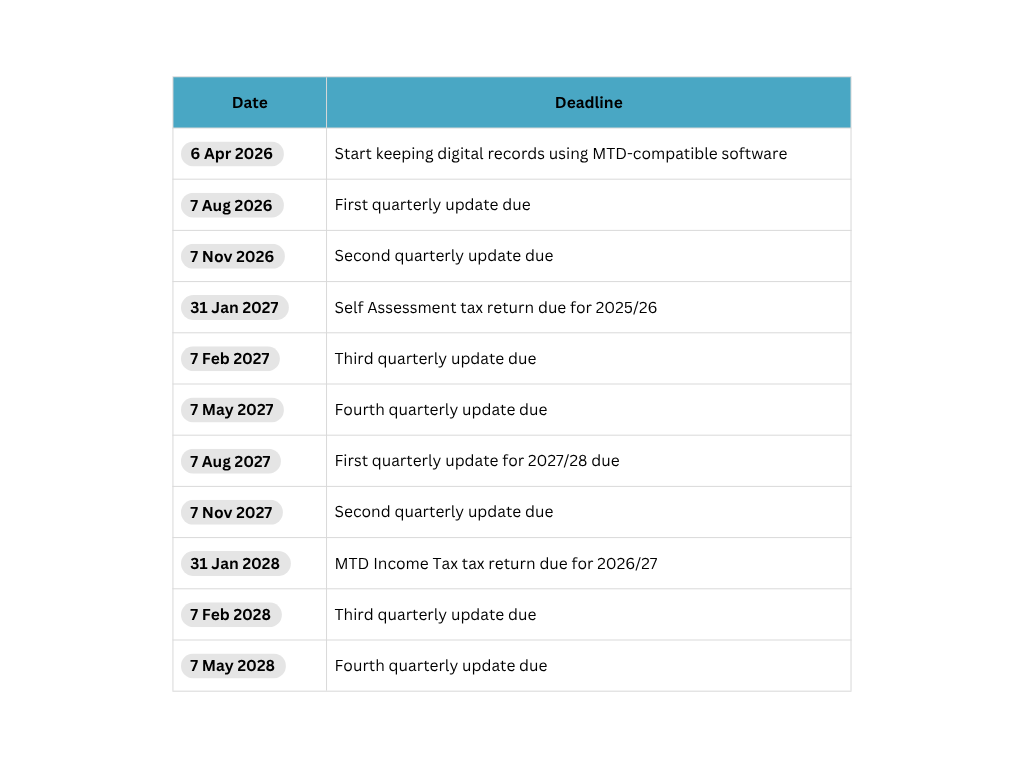
Key MTD Deadlines You Need to Know
The deadlines for Making Tax Digital depend on which MTD requirements apply to you. For MTD for Income Tax, you will have new quarterly reporting deadlines throughout the tax year, alongside the existing deadline for submitting your final tax return and paying any tax due.
For businesses and landlords moving to MTD for Income Tax, the key dates include the start of the relevant tax year, quarterly reporting deadlines and the deadline for the final tax return. The first phase of MTD for Income Tax begins on 6 April 2026 for those with qualifying income above £50,000.
VAT-registered businesses already within MTD must continue to follow their existing VAT return and payment deadlines.
It is important to understand which deadlines apply to you and make sure your software and digital records are ready in advance.
What Happens If You Don’t Comply with MTD?
If you are required to use MTD and don’t comply, you may face penalty points, fines and interest charges and increased HMRC scrutiny.
For MTD for Income Tax, HMRC is introducing a points-based system for late submissions. From the 2027/28 tax year, you will receive one penalty point for each missed quarterly update or tax return deadline. Once you reach four points, a £200 penalty applies, followed by another £200 penalty for each subsequent missed submission deadline.
There is an important transitional point for the first year of mandatory MTD for Income Tax. HMRC will not apply penalty points for late quarterly updates during the 2026/27 tax year, although you still need to submit all quarterly updates before you can submit your tax return. Penalties can still apply for late tax returns and late payments.
Late payment penalties can also apply if you do not pay your tax by the relevant deadline. The amount depends on how late the payment is.
| 2026/27 tax year | 2027/28 tax year | |
| Payment up to 15 Days late | No penalty | No Penalty |
| Payment up to 16 to 30 days late | 3% of the tax owed, or no penalty if it is your 1st year | 4% of the tax owed, or no penalty if it is your 1st year |
| Payment 31 days or more | 3% of the tax owed at day 15, and 3% of the tax owed at day 30 | 4% of the tax owed at day 15, and 4% of the tax owed at day 30 |
Get Help Becoming MTD Compliant
Making Tax Digital does not need to be complicated, but getting the right systems in place is important.
Whether you need help choosing compatible software, keeping your digital records up to date, submitting VAT Returns or managing your MTD for Income Tax obligations, we are here to help.
At Ridgefield Consulting, we can help businesses and individuals with bookkeeping, VAT Returns and wider tax compliance, helping you understand what MTD means for your circumstances and keep your records in order.
FAQs
Can I use a spreadsheet for MTD?
Yes. You can use a spreadsheet, such as Excel, to keep digital records for MTD, provided your records meet HMRC’s requirements.
However, Excel cannot submit your MTD return directly to HMRC. You will need to use compatible MTD software to make the submission. If you keep your records in a spreadsheet, bridging software can connect your spreadsheet to HMRC and allow the required information to be submitted digitally.
You also need to make sure that any transfer of information between your spreadsheet and other software complies with HMRC’s digital linking rules. Simply copying and pasting or rekeying relevant figures between systems does not meet the requirements.
How much does MTD software cost?
The cost depends on the software you choose and the features you need. There are a range of MTD-compatible products available, including free and low-cost options.
Rather than choosing software based solely on price, consider whether it supports the specific MTD requirements that apply to your business and whether it can handle your wider bookkeeping needs.
What counts as qualifying income for MTD?
Qualifying income is your total gross income from self-employment and property before expenses.
For example, if you are a sole trader and a landlord, income from both activities may count towards your qualifying-income threshold.
Income such as employment income, dividends, pensions and your share of partnership profits does not count towards the qualifying-income threshold.
Does MTD apply to sole traders?
Yes, MTD for Income Tax applies to eligible sole traders based on their qualifying income.
From 6 April 2026, it applies to sole traders with qualifying income above £50,000 based on their 2024/25 tax return. The threshold then reduces to more than £30,000 from April 2027 and more than £20,000 from April 2028.
If you are below the relevant threshold, you may not currently need to use MTD for Income Tax, although the rules are being phased in over several years.
Stay up to date
Subscribe to our monthly digest newsletter to stay on top of the latest tax changes, new rules, and practical tips.
Subscribe to our newsletter
Looking for some help?
If you’re ready to hire an accountant, then get started by completing our contact form for an introductory call to discuss your needs.
You can find out more about our bookkeeping service.
Related articles
We hope you enjoyed reading this article. If you would like to read
similar posts on this subject here are some more for you.
Back to Tax Guides Home